
How to Set OKRs in Menthory with 7 steps
Setting and tracking goals can be a daunting task, especially when teams are spread across various departments. This is where OKRs (Objectives and Key Results) come into play. They offer a straightforward yet robust framework to help teams remain aligned, focused, and accountable.
In this blog post, we will guide you through the process of setting and managing OKRs using Menthory, our AI-powered tool designed to simplify goal management.
Understanding OKRs
Before we dive deeper, let's clarify what OKRs entail:
Objectives → What you aim to achieve.
Key Results → Metrics that will help you measure your progress.
This framework enables teams to link their daily tasks to broader organizational goals.
Before reading this article, take a look at how to set OKRs right.
Step 1: Log In and Navigate to the OKRs Section
After logging into your Menthory account, go to the OKRs section located in the left-hand menu. This serves as your central hub for creating, managing, and tracking OKRs.

Step 2: Define Your Vision and Goals
Every successful OKR begins with a clear vision. In Menthory, start by entering your company vision and general goal. This step ensures that all subsequent objectives align with the overarching mission.

Step 3: Configure Your Iteration
OKRs are established in cycles, referred to as iterations. Within Menthory, you can:
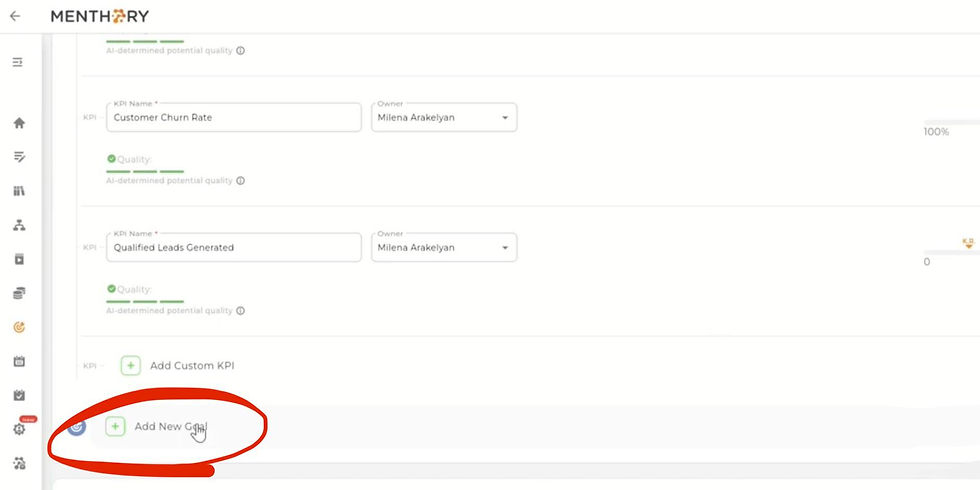
Configure a new iteration by clicking “Add a new goal” and filling in key details.
Compose your own goal or utilize Menthory’s AI-powered goal generator for brainstorming assistance.
👉 Example: “Foster a scalable, accountable, and motivated team culture across departments.”
The tool will instantly evaluate the quality of your goal and may offer enhanced variations if necessary.
Step 4: Add KPIs and Assign Owners
Once your goal is established, Menthory will suggest KPIs (Key Performance Indicators) to measure success.
Designate an owner for each KPI.
Set parameters such as units of measurement, target outcomes, and preferences.
If a KPI lacks clarity (e.g., “Acquire a car for team members”), Menthory will flag it as low-quality and propose a more effective alternative.
After starting an iteration, all department managers will automatically be notified to add their department-level objectives and align them with the company goal.

Step 5: Set Objectives for Your Iteration
With your goals and KPIs finalized, it’s time to establish objectives:
Navigate to the Objectives tab.
Select the iteration and click “Configure.”
Choose a KPI that your objective will support.
Configure your objective: give a clear understandng of which part of the global goal your department will focus on. You can generate your objective using AI or compose it manually.
Add KPIs with flexible units: percentages, numbers, or even negative values.
Once you launch an iteration, your team will automatically receive an email notification, ensuring everyone stays informed.

Step 6: Manage Personal Initiatives
OKRs are not just for overarching company goals; they can also enhance individual performance. In Menthory, you can:
Navigate to “My Initiatives.”
Click “Set an initiative.”
Select a KPI and generate your personal initiative.
This approach connects both team and individual goals, providing a comprehensive view of progress.

Step 7: Track Progress and Celebrate Wins
As you advance, you can update progress directly in Menthory and mark initiatives as achieved upon completion. After the OKR has been set, when setting the goals, objectives and KPIs each department member gets notified. This practice keeps teams motivated and ensures accountability at every level.
Final Thoughts
Menthory simplifies OKR management by merging clear goal-setting with AI-powered support. Whether you are defining company-wide objectives, setting departmental goals, or tracking personal initiatives, everything remains interconnected
one streamlined platform.
🎥 Watch the full tutorial here: How to Set and Manage OKRs in Menthory 📌 Follow us on YouTube and LinkedIn for more tips and updates.


Comments